
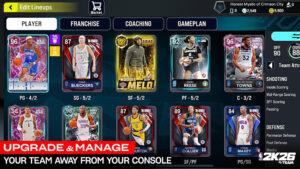
If you’re eager to bring the full MyTEAM experience of NBA 2K26 to your phone, installing NBA 2K26 MyTEAM Mobile APK is a great way to go. The official APK version offers the full card-collection and team-management modes on Android – with cross-progression for console players, support for NBA and WNBA player cards, and all core MyTEAM game modes like Breakout, Domination, Triple Threat, and more. In this guide, I’ll walk you through how to safely download and install the latest NBA 2K26 MyTEAM Mobile APK, cover system requirements, show how to handle errors, and share tips to optimize loading speed and general performance.

System Requirements and What You Need to Know Before Installing
Before installing, make sure your device meets the minimum requirements for a smooth experience:
- The latest official listing shows the app supports Android 9.0 or higher.
- Keep in mind that the APK file size is around 1.8 GB, you will need enough free internal storage (plus space for additional in-game data and updates).
- Because it’s a full 3D basketball simulation with real-time multiplayer and cross-progression, a stable internet connection is required for optimal performance.
If your device meets these, you’re ready to proceed.
How to Download & Install NBA 2K26 MyTEAM Mobile APK Free For Android: Step-by-Step
Here’s a straightforward installation guide you can follow:
- Open APKQiQi and find NBA 2K26 MyTEAM Mobile.
- Tap the Download button, please wait about 10 seconds for the APK file to be set up and start the download process.
- Once the download is complete, install the app on your device.
- Launch the app after the installation is complete.
Note
- If this is your first experience installing apps/games from APKFami, please navigate to Settings > Security and enable “Unknown Sources” on your Android device before proceeding.
- Click here for instructions on installing apk/xapk files.
Common Issues & Error Handling Tips
Even with the right set-up, installing large APKs can run into issues. Here’s how to handle common problems:
- “App not installed” error: usually caused by download errors, insufficient storage space, or incompatible Android versions. Solution: re-download the file, free up space, or check Android version compatibility.
- Settings stuck,crashed on launch: could be due to missing permissions or network issues while loading more data. Try clearing cache, granting all permissions and using Wi-Fi.
- Laggy, choppy performance or long loading times: make sure your device has enough RAM, free memory, close background apps or reboot before launching. Since the app is large and resource intensive, device resources and internet stability are important.
- Security warning about external APKs: always download from trusted sources and, if possible, scan with a security app. Android requires manual approval for installations from unknown sources.
Tips for Optimized Loading Speed and Smooth Use
To enjoy NBA 2K26 MyTEAM Mobile without hiccups, these practices help:
- Use Wi-Fi (preferably high-speed) during first launch and asset downloads to avoid interruptions.
- Keep at least 2-3 GB of free space after installation to allow room for caches, updates, and to prevent performance slowdowns.
- Close background apps (especially heavy ones) before launching the game to free RAM and reduce lag.
- If your device supports controllers, consider pairing a Bluetooth controller for more natural controls and smoother gameplay.
- Restart your device occasionally, especially when you are experiencing memory or performance issues, this helps free up system resources.
Conclusion
Installing NBA 2K26 MyTEAM Mobile on Android can give you a powerful mobile version of the console MyTEAM experience with a player collection, full game modes, and cross-progression, all accessible from your phone. By following the safety steps above, meeting the system requirements, and carefully handling bugs and performance optimizations, you can enjoy a seamless basketball journey on the go. Just remember to download from trusted sources, keep enough free storage space, use a stable internet connection for updates and syncing, and consider controller support for the best experience. Enjoy building your dream team and hitting the court anytime, anywhere.